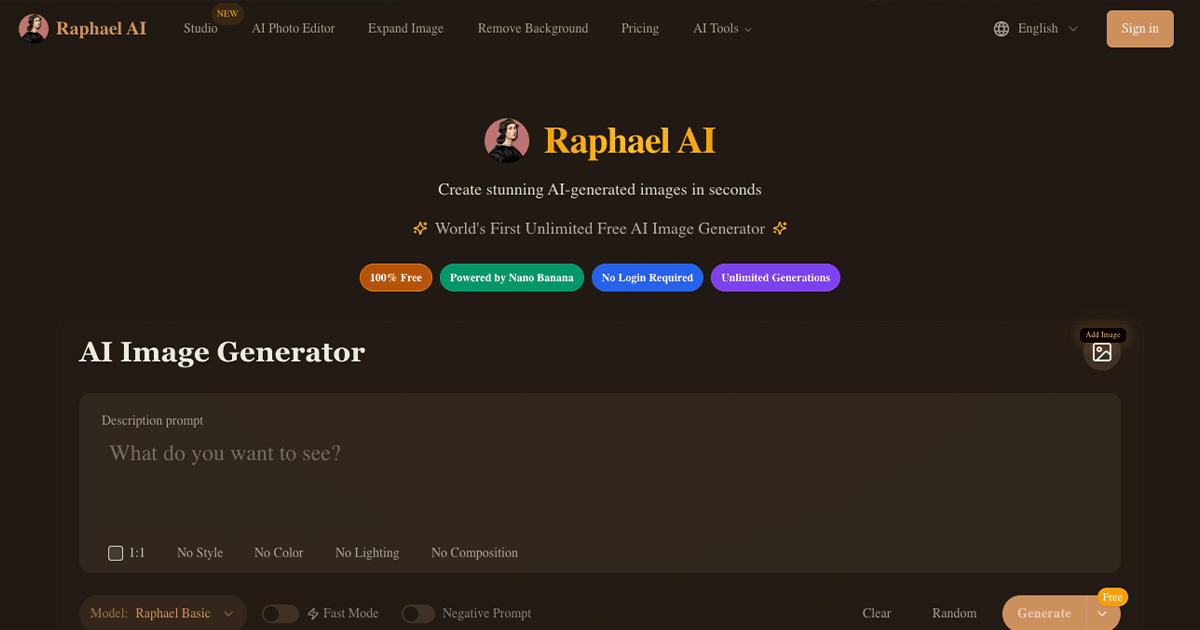
Raphael AI has positioned itself as a completely free AI image generator since its launch. We spent two weeks testing the image generation, style options, and overall user experience. The zero-cost model impressed us—but some limitations are worth noting.
Raphael AI offers decent free image generation with no signup required, but watermarks on free images, limited resolution (1024x1024), and basic features hold it back for serious creators. Rating: 3.5/5
What is Raphael AI?
Raphael AI is a free AI image generator powered by the FLUX.1-Dev model. Launched as a browser-based tool, it lets users create images from text descriptions without any registration or sign-up required.
The platform emphasizes accessibility with its "free, unlimited, no-registration" approach. It supports multiple artistic styles from photorealistic to anime, making it suitable for beginners exploring AI image generation.
Raphael AI Features
Text-to-Image Generation
Raphael AI's core feature is straightforward text-to-image generation:
No Signup Required
Generate images immediately without creating an account. Just enter your prompt and click generate.
Multiple Styles
Support for various styles including photorealistic, anime, digital art, oil paintings, and more.
Image Generation Quality
The FLUX.1-Dev model produces decent results for a free tool:
- Resolution: Maximum 1024x1024 pixels
- Quality Score: Average 4.9/5 according to their stats
- Speed: Relatively fast generation times
Style Options
Raphael AI supports creating images across various artistic styles:
- Photorealistic portraits and scenes
- Anime and manga-style artwork
- Oil painting and classical art styles
- Digital art and illustrations
- Fantasy and sci-fi concepts
Privacy Features
One notable positive is their zero data retention policy. Images are stored temporarily in your browser tab only, meaning they disappear if you refresh or leave the page idle too long.
Raphael AI Pricing
| Plan | Price | What's Included |
|---|---|---|
| Free | $0 | Unlimited generations, watermarked images |
| Premium | Varies | No watermarks, faster processing, priority queue |
| Ultimate | Varies | Highest priority, Raphael Pro model access |
While technically "unlimited," free images include watermarks. You'll need to upgrade for clean outputs, faster generation, and commercial use rights.
Pros and Cons
What We Liked
No Signup Required
Start generating immediately without creating an account or providing personal information.
Completely Free Tier
Generate unlimited images at no cost, making it great for experimentation and casual users.
Privacy-Focused
Zero data retention policy means your prompts and images aren't stored on their servers.
Simple Interface
Clean, straightforward UI that's easy for beginners to understand and use.
What Needs Improvement
Watermarks on Free Images
All free generations include watermarks, limiting practical use without upgrading.
Limited Resolution
Maximum 1024x1024 pixels is limiting for professional or print use cases.
No History Saving
Images only stored in browser tab—refresh and they're gone forever.
Web-Only Access
No mobile apps available yet, limiting on-the-go creativity.
Raphael AI vs Kosoku AI
If you're considering Raphael AI, you should also look at Kosoku AI as an alternative. Here's how they compare:
| Feature | Raphael AI | Kosoku AI |
|---|---|---|
| Price | Free (watermarked) | Free tier available |
| Signup Required | No | Optional |
| Image Quality | Good (1024px max) | High quality |
| Generation Speed | Fast | Blazing fast |
| Watermarks | Yes (free tier) | No watermarks |
| History/Gallery | No (browser only) | Yes, saved to account |
| Style Options | Multiple | Multiple + custom |
Why Consider Kosoku AI?
While Raphael AI offers free unlimited generations, they come with watermarks and no history saving. Kosoku AI provides blazing fast generation, high quality outputs, and saves your creations to your gallery—all without forced watermarks on your work.
Key Differences
- Quality: Kosoku AI offers higher resolution and better detail in generations
- Speed: Kosoku AI is optimized for blazing fast generation times
- History: Kosoku AI saves your creations; Raphael loses them on page refresh
- Watermarks: Kosoku AI doesn't force watermarks on your images
Frequently Asked Questions
Final Verdict
Raphael AI Rating: 3.5/5
Raphael AI delivers on its promise of free, no-signup image generation, making it an excellent entry point for beginners curious about AI art. The zero data retention policy is a nice privacy touch.
However, the watermarks on free images, 1024px resolution limit, and lack of saved history are significant limitations for anyone doing serious creative work. The browser-only storage means one accidental refresh destroys all your work.
Our recommendation: If you want to experiment with AI image generation without any friction, Raphael AI is a fine starting point. But for regular creative work where you need higher quality, saved history, and no watermarks, Kosoku AI offers a superior experience with blazing fast generation and a proper gallery to save your creations.